


There are two ways to create managed service agreements in ConnectWise PSA:
- The correct way.
- The incorrect way.
We see “MANY” agreement setups, some are awesome, and some… not so awesome. Why so not awesome? While one purpose of an agreement is for recurring billing, another is to show profitability of it’s use for each client. This can only be accomplished if “EVERYthing” is included.
Let’s say your company has an all-inclusive per seat type managed services agreement. This could be per device or per person, for this it doesn’t matter. What does matter is that ALL service products are included in each client agreement, with costs.
An example might look like this:
- Managed Server
- Managed Workstation
- Managed User
- Anti-Virus
- Spam Filtering
- Duo
- EDR
- User Office 365 Backup
The items in blue should be present on the invoice as they are billable products, with their counts determining the total per line item.
The items in red are considered Tool-Shed products, items which are included to deliver the level of support desired by the managed service provider (You). These items are often forgotten in the agreement setup, expecting these will show in P&L for operation costs. In the end, while the P&L might look ok, can we really look at the total profitability of each client if they are not included in each respective agreement?
Your correct if you answered no.
Including these items with their costs in each agreement is what needs to happen to help gain a better view for each clients agreement, but what if it’s not desired to have each line item show on the invoice?
Great question, and this blog article gives a quick method to handle this.
This example shows three items as part of this agreement. Two items are billable, the third is a Tool-Shed item and should not be viewable on the invoice.
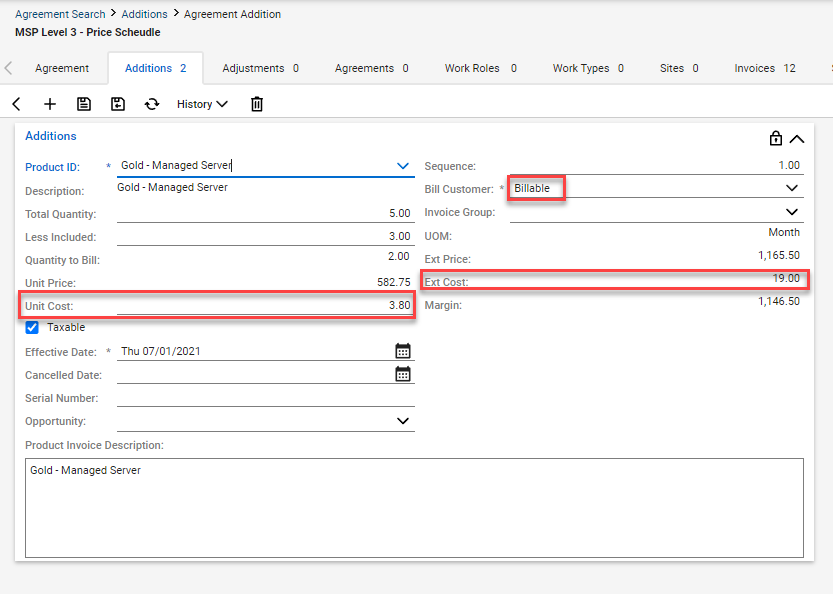
First item: Managed Server.
This item is an integrated agreement addition product. It’s count will vary, depending on the amount of devices in coverage.
The unit price X count determines the revenue sub-total for this line item. This will show on the invoice.
The unit cost X count determines the cost sub-total for this line item. This is an internal calculation for reporting.
Note the Bill Customer is selected as “Billable”.
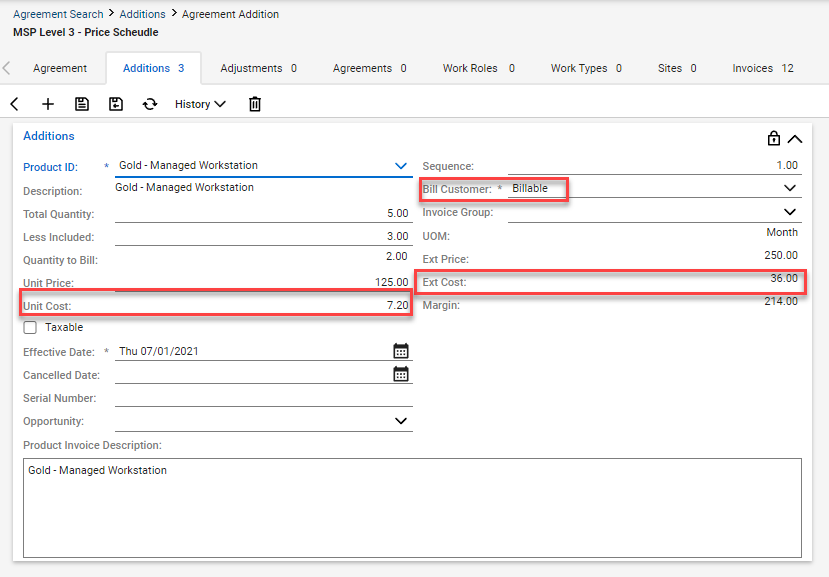
Second item: Managed Workstation.
This item is an integrated agreement addition product. It’s count will vary, depending on the amount of devices in coverage.
The unit price X count determines the revenue sub-total for this line item. This will show on the invoice.
The unit cost X count determines the cost sub-total for this line item. This is an internal calculation for reporting.
Note the Bill Customer is selected as “Billable”.
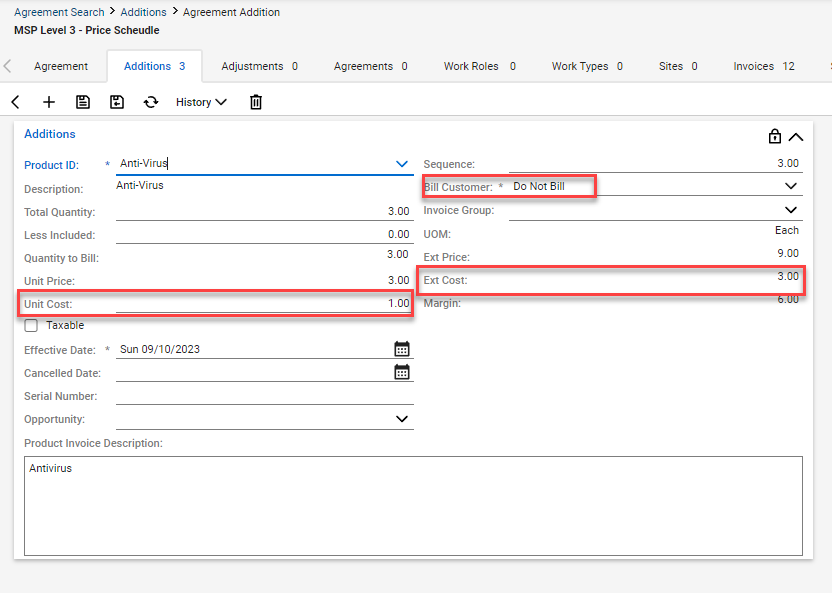
Third item: Anti-Virus.
This item is an integrated agreement addition product. It’s count will vary, depending on the amount of devices in coverage.
The unit price X count determines the revenue sub-total for this line item. This will NOT show on the invoice, due to the Do Not Bill setting for this item. Many times this item will have 0 as the revenue price, which is ok.
The unit cost X count determines the cost sub-total for this line item. This is an internal calculation for reporting.
Note the Bill Customer is selected as “Do Not Bill”.
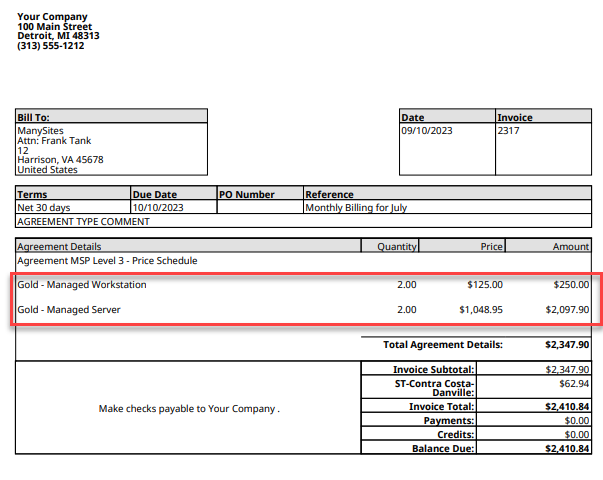
When the invoice is created, the first two items are shown on the invoice, the third is left off the invoice, so the customer only sees the billed items.
One negative item to mention is that while this method handles the invoicing and reporting aspect as needed for our reporting, it doesn’t show value to the client, as there is no note showing that antivirus is present as part of the agreement offering.
Take a look at Invoice Groups, a neat feature of ConnectWise PSA, in how to give more insight to your agreements. Read more..
Agreements are the heart and soul of a managed services operation, but without proper setup, the outcome is as good as a paper weight on your desk.
Take the time to review your agreements, make sure all the associated costs are included, and create a “marketing aspect” to show value.
Should this task be daunting, no fear, just give us a jingle to discuss how our consulting services can be of assistance.




