


ConnectWise pushed a new update on December 19, 2024 which should resolve all of the known issues with the ASIO Server Connection / Email Connector.
A couple years ago, we brought a very important issue to our blog. Unprocessed emails in the Mailbox Failed Folder.
Here is that blog: Inbox.Failed
Well we stumbled on this again while trying to implement the ASIO email connection. After a couple months of working with development to get this connector to work, we found that around 50% of inbound emails we ending up in the Failed Folder.
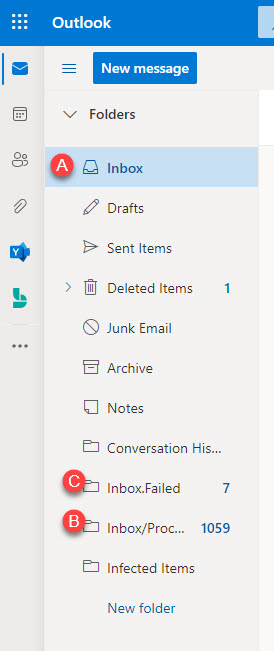

Since we practice what we preach, alerting notified us of the failed emails. We felt this topic should be discussed again seeing our recent experience, mainly as we don’t want to see other ConnectWise Partners having failed emails and not knowing!
Without monitoring, emails sitting in the failed folder will never find their way to a ticket, possibly resulting in client account issues.
One might ask, but what about the “Send Errors To*” field within the Email Inbox Connection?

This field only works for On-Premises instances as ConnectWise disabled this for all Cloud Instances in fear of “spamming”. This is why setting up a monitoring system is so important.
Check out our previous blog Inbox.Failed to learn how we use Microsoft Power Automate to help notify us when an email lands in the Failed Folder.
You might also check any of the various bot type SaaS applications for alternative types of inbox monitoring.




