


Unlocking the Potential of Extra Data Fields (EDFs) in Automation
Introduction
Extra Data Fields (EDFs) are a cornerstone of automation in ConnectWise Automate. These customizable fields can store and manage data manually or automatically, providing a robust way to enhance efficiency and organization. Today’s blog article explores the purpose of EDFs, their field types, key usage sections, and practical examples.
Understanding EDFs
Extra data fields (EDFs going forward) are a key component of Automation. These custom fields can be created in various sections of Automate and are used to store data, either input manually or automated through a script.
Types of EDFs
There are three input types for EDFs:
-
- Checkbox: For enabling or disabling options.
- Dropdown Menu: For selecting from predefined values.
- Text Field: For freeform or script-generated input.
Where Can EDFs Be Used?
EDFs can be created within the following sections, with the most common usage sections being Clients, Locations, & Computers.
-
- Clients
- Locations
- Computers
- Probes
- Network Devices
- Tickets
- Groups
- Contacts
Practical Use Cases for EDFs
1. EDFs as Data Storage
Text fields in EDFs allow for manual or automated data input.
-
- Manual Input Example:
At the location level, a technician can input notes referencing PSA tickets for easy tracking of previous work.
- Manual Input Example:
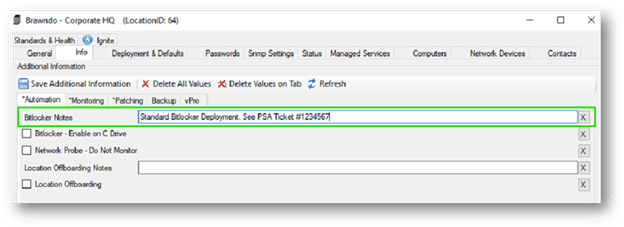
EDF at Location used for notes
-
- Automated Input Example:
At the computer level, EDFs can store PowerShell output, such as drive encryption status (“Fully Encrypted”) and recovery keys. This is achieved using the ‘ExtraData Set Value’ script function. Alternatively, the ‘SQL Execute’ function can update EDFs directly in the database (SQL expertise required).
- Automated Input Example:
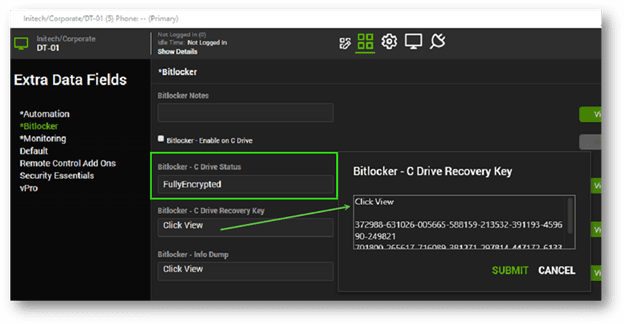
Agent level EDF showing data stored from script.
2. EDFs as Search Criteria
Checkbox fields act as toggles for automation or visual indicators.
-
- Example: Automation Toggle
A checkbox EDF at the location level enables or disables BitLocker disk encryption for all agents. Checked = encryption enabled; unchecked = disabled.
- Example: Automation Toggle
In this setup, the checkbox integrates with Searches and Groups to trigger the appropriate automation scripts. While this example highlights BitLocker, the flexibility of EDFs allows for similar applications in other scenarios.
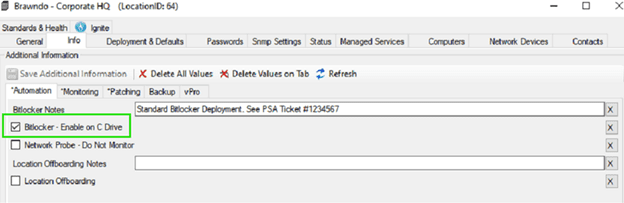
Location EDF to enable automation.
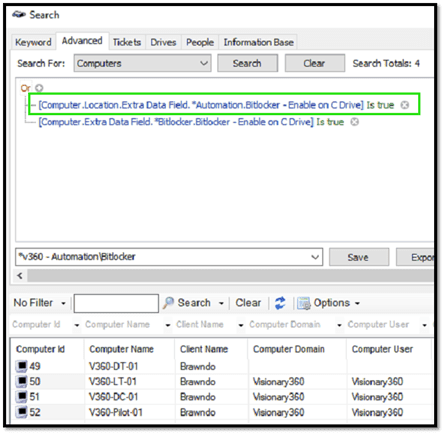
EDFs as Search Criteria
3. EDFs for Selection and Data Validation
Dropdown fields ensure data consistency by restricting input to predefined values.
-
- Example: Patch Schedule Selection
At the location level, separate EDFs for workstation and server patch schedules ensure only specified times can be selected. This reduces errors and enforces a consistent patching strategy.
- Example: Patch Schedule Selection
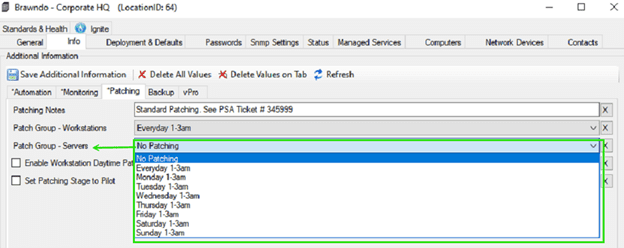
EDF at Location utilizing dropdown to specify patching schedule
Conclusion
Extra Data Fields (EDFs) are an invaluable resource for enhancing automation in ConnectWise Automate. By leveraging EDFs effectively, organizations can:
-
- Streamline workflows.
- Maintain data consistency.
- Automate complex tasks with ease.
Whether it’s storing critical notes, toggling automation features, or ensuring data accuracy with dropdown menus, EDFs empower teams to work smarter and more efficiently.
As automation needs evolve, stay proactive in refining EDF configurations and scripts to maximize their potential. For questions or further guidance, feel free to reach out—we’re here to help.




