ConnectWise Automate | Optimizing your Browse Screen
Technicians spend most of their time at the computers ‘browse’ screen. By default, there is a lot of computer information presented. Some of it we’ll need and some we won’t.
Did you know you can modify the columns to meet your needs? Maybe the ‘service version’ is an unnecessary field and is just taking up space? Maybe ‘Last Contact’ is important to you, yet the column is so far to the right that you need to scroll over every time you want to view it?
The good news is that you can adjust the columns in a few different ways.
Go from this…
to this…
Here’s how.
Add or hide (remove) columns.
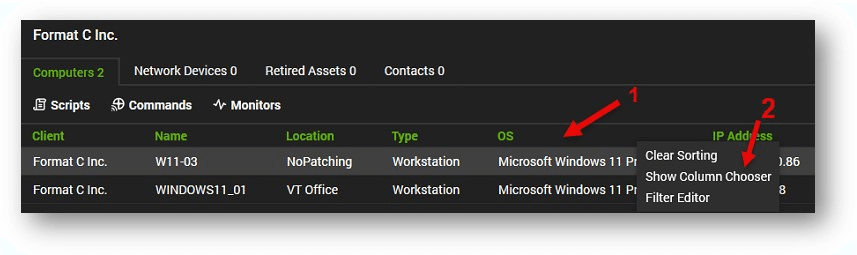
Right click a column header. Any header will do.
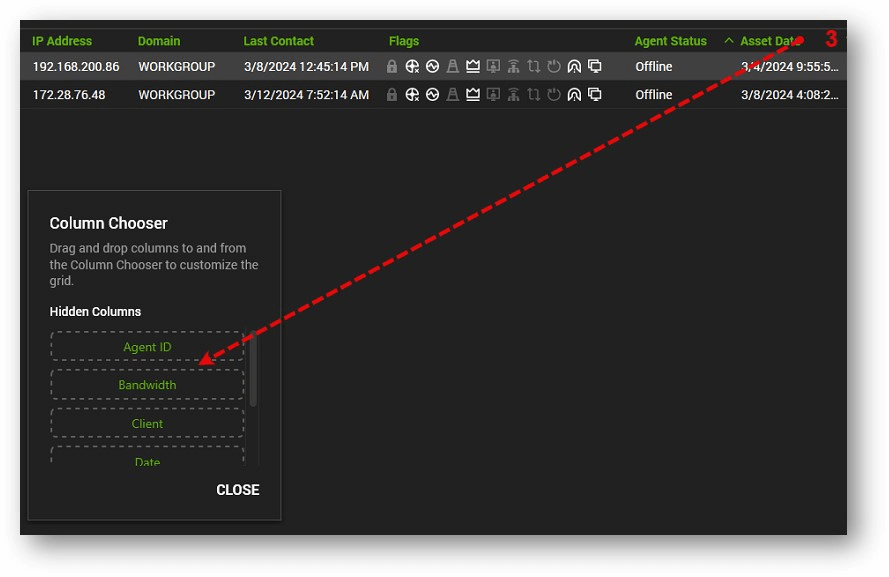
Select ‘Show Column Chooser’. The Column Chooser box will pop up.
3. To remove unnecessary columns, Left click, hold, and drag the header you want to remove into the ‘Hidden Columns Box. In this example, we’ll drag the Asset Date down to the Hidden Columns box.
4. To add columns, select the column you want to add from the Hidden Columns Box, and drag it back to the headers. You’ll see 2 white arrows showing where the new column will be placed.
Organize Columns.
To change the order of your columns. Left click and hold the header that you want to move it wherever you want it. White arrows will show you where the column will be inserted.
At Visionary 360, we’re a team of experienced business coaches who help Technology Solution Providers make the most of their tools with a strong focus on financial clarity.
We’re more than consultants. We’re partners who love solving problems, simplifying complexity, and turning frustration into progress. Our clients become part of the Visionary 360 family, and we take pride in celebrating their growth and success.
There’s no greater satisfaction than seeing a partner’s business thrive—streamlined, profitable, and confident in every step forward.