Sending invites manually with TimeZest | ConnectWise Manage PSA
Many ConnectWise Manage Partners use a third party known as TimeZest to help managed scheduling meeting invites. One feature which we at Visionary 360 would love to see integrated is the ability to manually pick a time and allow TimeZest to handle the rest. One problem, TimeZest doesn’t do this right now.
While chatting with a member at TimeZest, they mentioned a work around.
1. Copy the url appointment type.
2. Paste into notepad.
3. Change SRNUMBER with the actual ticket number.
4. Copy and paste the updated url to a browser.
5. Input the ticket contacts information.
6. Select the desired time and finalize.
7. The ticket contact will receive the meeting invite confirmation.
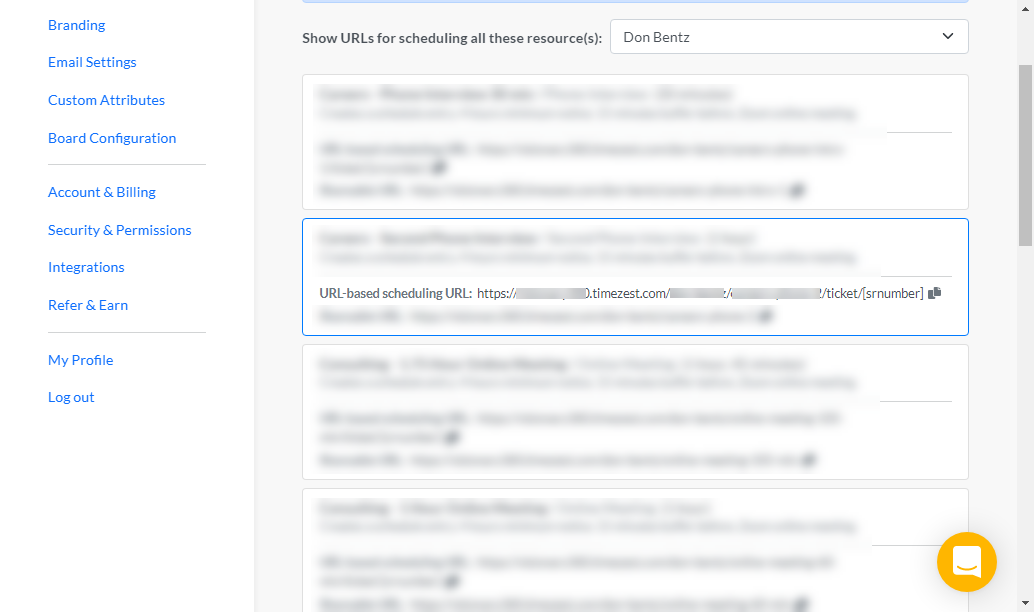
Shown to the right is a view of appointment types.
An appointment type can be copied by clicking on the small icon to the right side of the appointment type.
To help understand the TimeZest url:
A. This is your companyname (Created during system setup).
B. User name: This is the url-slug set during the TimeZest user setup. This would be your name.
C. Appointment Slug: The slug determines the appointment type.
D. Click to enable copying the full url.
One really does not need to fully understand the url syntax, but it can help when multiple appointment types are used.
Copy all of the possible appointment types which might need used for manually scheduling appointments, paste into a notepad file which can be found quickly.
Use these to schedule an appointment with client when a particular time is known, instead of allowing the ticket contact to schedule themselves.
At Visionary 360, we’re a team of experienced business coaches who help Technology Solution Providers make the most of their tools with a strong focus on financial clarity.
We’re more than consultants. We’re partners who love solving problems, simplifying complexity, and turning frustration into progress. Our clients become part of the Visionary 360 family, and we take pride in celebrating their growth and success.
There’s no greater satisfaction than seeing a partner’s business thrive—streamlined, profitable, and confident in every step forward.